

 English
 العربية



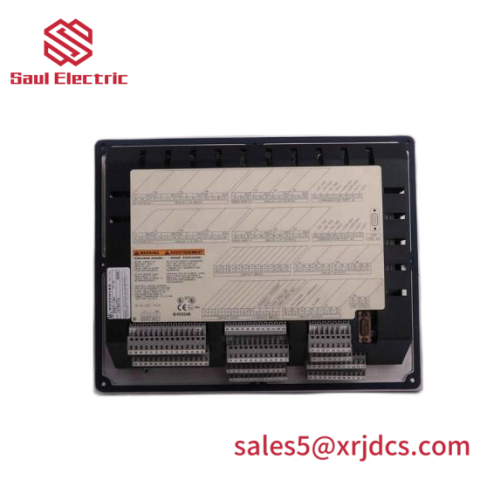
The Woodward 8446-1019 RP-3000 Generator Remote Panel is a remote visualization and control panel for the Woodward easYgen-3000 Series genset controllers. It provides a front-panel operating interface for easYgen-3200/3500 (door-mounted) or easYgen-3100/3400 (back-panel-mounted) controls, connected via CAN bus (CANopen) with full display, monitoring, and command capability away from the high-voltage wiring.
Key Features
- Remote display and control interface for easYgen-3000 Series genset controls
- Works with easYgen-3200/3500 (door mount) and easYgen-3100/3400 (back-panel mount, with reduced door wiring)
- CAN bus (CANopen) connection to the easYgen control — via CAN 1 or CAN 2, 250 kBd
- Operation and menu structure identical to the easYgen-3000 Series display
- Isolated RS-232 interface and isolated CAN bus interface
- 12/24 V DC supply (8–40 V DC), max. 12 W consumption
- EasYpack housing: approx. 282 × 217 × 67 mm, approx. 1,300 g
- Front protection IP54 (clamp) / IP66 (screw kit); marine type approval (Lloyd’s Register), ABS design assessment
Technical Specifications
- Part Number: 8446-1019
- Product Type: Remote Panel — visualization and control interface
- Compatible Controls: easYgen-3200/3500 (V1.15xx+) and easYgen-3100/3400 (V1.17xx+); V1.13xx supports Package P2 only
- Connection: CAN bus (CANopen), 250 kBd, via easYgen CAN 1 or CAN 2
- Power Supply: 12/24 V DC (8–40.0 V DC); max. intrinsic consumption 12 W
- Interfaces: Isolated RS-232 (standard); isolated CAN bus (no internal line termination)
- Supply Terminals: 61 PE (2.5 mm²), 63 12/24 V DC, 64 0 V DC; recommended protective device 6 A (fuse NEOZED D01 or MCB 6 A/C)
- Housing: EasYpack; approx. 282 × 217 × 67 mm (W×H×D); front cutout 249 × 183 mm
- Weight: approx. 1,300 g
- Protection: IP54 front (clamp fasteners), IP66 front (screw kit), IP10 rear
- Environmental: Max. elevation 2,000 m ASL; degree of pollution 2
- Certifications: CE; UL/cUL Ordinary Locations; Lloyd’s Register type approval; ABS design assessment
- Origin: United States
Installation Notes
- Connect protective earth (PE) to terminal 61 (conductor ≥ 2.5 mm²) before applying power.
- Supply 12/24 V DC to terminals 63/64 (8–40 V DC); install the recommended 6 A slow-acting protective device in the supply line.
- Connect the RP-3000 to the easYgen control via CAN 1 or CAN 2 (250 kBd); do not connect a PC with ToolKit on the same CAN bus as the RP-3000.
- For marine (bridge/deck zone) installations, add an EMI filter on the supply inputs and follow Lloyd’s Register rules.
Common Questions
What is the RP-3000 used for? It is a remote panel that gives front-panel display and control for easYgen-3000 Series genset controllers — particularly useful when the easYgen is mounted on the back panel, greatly reducing door wiring while keeping high-voltage connections safely inside the panel.
How is the RP-3000 connected? Via CAN bus (CANopen) to the easYgen control — either CAN 1 or CAN 2 at 250 kBd.
Which easYgen versions are compatible? easYgen-3200/3500 with software V1.15xx or higher, and easYgen-3100/3400 with V1.17xx or higher; with V1.13xx only Package P2 devices are supported.
What power does it need? 12/24 V DC (8–40 V DC), max. 12 W; use the recommended 6 A protective device in the supply line.


There are no reviews yet.